Training
- Create Events
- Create Conferences
- Manage Events and Conferences
- Manage Group
- Attendee Check-in
- Waitlist Tickets
- Build Event Feed Widgets
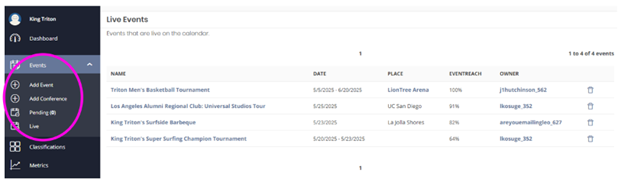

Click on “View Event” to open your event page.

Click on “View Confirmed Tickets” to see a list of users who have registered for your event.
Click on “Export to CSV” to generate an email with a link to download the report.
Register for your guests by clicking “Issue Ticket”. After you fill out the attendee fields, click “Save Changes” on the bottom right.
Optional: After the changes are saved, send a confirmation email to the guest by clicking “Resend Ticket” at the top right.
You can create a waitlist ticket type option once you've hit capacity on an event's registration or you can create this ticket option before capacity, it's really just your preference. Learn about waitlist tickets.
If you are using the platform's ticketing and registration feature, your event registrants will automatically receive a reminder the day before the event.
This reminder cannot be disabled and content is not customizable. The reminder will include the essential event details including date, time and location.
Send custom notices to anyone listed on the event's attendees list using the “Event Promotion” tool by email or social media post. The custom notice is entirely text based. Learn how to send custom messages.
If you want to send more robust event reminders, you can use MyEmma to send updates to your registrants. If you don’t have a MyEmma subaccount, please visit Tools, Platforms, and Services and contact servicedesk@ucsd.edu to get started.
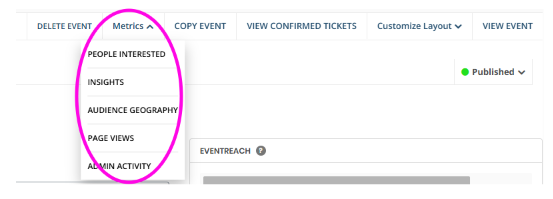
Click on the “Metrics” dropdown to see a list of metric options to review.

You can delete your event page by clicking on “Delete Event”.
If your event is canceled or postponed, we recommend updating the status of your event under Publish Event instead of deleting.

You can create a copy of the event which will include the same description, dates, ticketing, attendee questions, and event settings.
This is a useful tool to duplicate events with various ticketing and attendee questions so you don’t have to add them individually again.
Just be sure to update the event name and schedule after copying! You will need to remove the copied dates.

We recommend you do not customize your page layout, but if you would like to prioritize different information on the page you can do so under the 'Customize Layout' link by dragging and dropping the content modules.